Showing posts with label sharepoint 2010. Show all posts

November 17, 2011

SharePoint: “Security validation for this page is invalid” when adding subsite programmatically

Problem:

I created a Web Part that is used for creating subsites. In Web Part properties you could type in the name of the Web Template you had uploaded to solution gallery, in addition to other properties. Web Part uses RunWithElevatedPrivileges.

For the first Web Template that was used everything worked fine and subsites could be created just fine. However, the slightly modifying the Web Template lead to the dreaded security validation error:

Exception attempting to ApplyWebTemplate to SPWeb https://URLOFTHENEWWEB: Microsoft.SharePoint.SPException: The security validation for this page is invalid. Click Back in your Web browser, refresh the page, and try your operation again. ---> System.Runtime.InteropServices.COMException (0x8102006D)

Thoughts:

There wasn’t really much difference between the Web Template that was working and the one that couldn’t be used in my web part when creating subsites.

In fact, what was done in this slightly modified version of the Web Templates was to add an instance of a Document Library template that contained few custom Content Types.

What makes it interesting was that one could create new subsite using that template, if one would use normal SharePoint browser functionality for subsite creation.

As it happens every now and then, I couldn’t reproduce this issue on my development virtual server – even when using the same Web Template.

worksonmymachine

Solution:

Although it is not exactly clear why having Document Library template on a web template would break subsite creation, there is a real solution.

What had forgotten was to call SPUtility.ValidateFormDigest() before attempting to add the subsite.

Also MSDN instructs that “Either SPUtility.ValidateFormDigest or SPWeb.ValidateFormDigest should be called before a call of RunWithElevatedPrivileges, if the method passed to the RunWithElevatedPrivileges includes any write operations.”

Reason for running the validation is to prevent cross-site-scripting exploits.

   1:  SPUtility.ValidateFormDigest(); // <<<<< REMEMBER THIS!
   2:  // ...
   3:  // Create site
   4:  using (SPWeb newWeb = parentWeb.Webs.Add(
   5:        projectUrl,
   6:        projectName,
   7:        "",
   8:        Convert.ToUInt32(locale),
   9:        siteTemplate,
  10:        true, // True breaks inheritance
  11:        false))


Thanks to Arttu Arstila for helping me with this.

November 8, 2011

SP2010: This upgrade session has been stopped

Problem:

After installing SP2010 SP1 and trying to run psconfigui (UI version of the Configuration Wizard) you end up with error:

[psconfigui] [SPUpgradeSession] [INFO] [11/8/2011 3:29:14 PM]: No context object
[psconfigui] [SPUpgradeSession] [ERROR] [11/8/2011 3:29:14 PM]: This upgrade session has been stopped. Possible causes include the process being terminated abruptly or the OS has rebooted. Please restart the upgrade again.

The only sensible error you see in PSCDiagnostics log is:

The exclusive inplace upgrader timer job failed.

Followed by generic error:

Failed to upgrade SharePoint Products.

You retry the Configuration Wizard, and you end up with same error.

Solution:

Run psconfig.exe (command line version) from command line and don’t use the graphical UI version.

Command to use: psconfig -cmd upgrade -inplace b2b -wait

June 23, 2011

SharePoint: Organization browser not showing Manager when Manager is set using PowerShell

Problem:
You are using PowerShell to set value for user’s Manager and you use email address when setting the value of the UserProfile[“Manager”].Value.

Looking at user profile, the Manager property looks correct, it even resolves domain account properly.

userprofile

However, Organization browser is not showing Managers for users.

Solution:
Don’t use e-mail when setting Manager value:

$userProfile["Manager"].Value = $managerEmail

instead use manager’s account name:

$managerProfile = $profileMgr.GetUserProfile($managerEmail)   
$userProfile["Manager"].Value = $managerProfile["AccountName"]

PS. CSV file we use for importing profiles doesn’t contain AD account name, that’s why I’m using email in the first place.

SharePoint: Changing user’s Manager is not reflected to Organization browser

Problem:
You update user’s Manager in User Profile Properties, then you go to My Site and refresh Organization browser but change is not there.

Thoughts:
Running search incremental crawl didn’t help, nor running the various SharePoint jobs.

Solution:
Surprisingly solution was to recycle My Site application pool from IIS, and no other action was required.

June 16, 2011

SharePoint: SPUpgradeSession errors in ULS log every 8 hours

Problem:
SharePoint 2010 ULS logs get bunch of error messages at around 2:00, 10:00 and 18:00. If there are more than one WFE in the farm, you will probably have the error related to every WFE.

Errors look like this:

[powershell] [SPUpgradeSession] [ERROR] [6.6.2011 9:59:01]: CanUpgrade [SPConfigurationDatabase] failed.[powershell] [SPUpgradeSession] [ERROR] [6.6.2011 9:59:01]: Exception: Login failed for user 'AD\WFESERVERNAME$'.
[powershell] [SPUpgradeSession] [ERROR] [6.6.2011 9:59:01]:   
     at System.Data.SqlClient.SqlInternalConnection.OnError(SqlException exception, Boolean breakConnection)    
     at System.Data.SqlClient.TdsParser.ThrowExceptionAndWarning(TdsParserStateObject stateObj)    
     at System.Data.SqlClient.TdsParser.Run(RunBehavior runBehavior, SqlCommand cmdHandler, SqlDataReader dataStream, BulkCopySimpleResultSet bulkCopyHandler, TdsParserStateObject stateObj)    
     at System.Data.SqlClient.SqlInternalConnectionTds.CompleteLogin(Boolean enlistOK)    
     at System.Data.SqlClient.SqlInternalConnectionTds.AttemptOneLogin(ServerInfo serverInfo, String newPassword, Boolean ignoreSniOpenTimeout, Int64 timerExpire, SqlConnection owningObject)    
     at System.Data.SqlClient.SqlInternalConnectionTds.LoginNoFailover(String host, String newPassword, Boolean redirectedUserInstance, SqlConnection owningObject, SqlConnectionString connectionOptions, Int64 timerStart)    
     at System.Data.SqlClient.SqlInternalConnectionTds.OpenLoginEnlist(SqlConnection owningObject, SqlConnectionString connectionOptions, String newPassword, Boolean redirectedUserInstance)    
     at System.Data.SqlClient.SqlInternalConnectionTds..ctor(DbConnectionPoolIdentity identity, SqlConnectionString connectionOptions, Object providerInfo, String newPassword, SqlConnection owningObject, Boolean redirectedUserInstance)    
     at System.Data.SqlClient.SqlConnectionFactory.CreateConnection(DbConnectionOptions options, Object poolGroupProviderInfo, DbConnectionPool pool, DbConnection owningConnection)    
     at System.Data.ProviderBase.DbConnectionFactory.CreatePooledConnection(DbConnection owningConnection, DbConnectionPool pool, DbConnectionOptions options)    
     at System.Data.ProviderBase.DbConnectionPool.CreateObject(DbConnection owningObject)    
     at System.Data.ProviderBase.DbConnectionPool.UserCreateRequest(DbConnection owningObject)    
     at System.Data.ProviderBase.DbConnectionPool.GetConnection(DbConnection owningObject)    
     at System.Data.ProviderBase.DbConnectionFactory.GetConnection(DbConnection owningConnection)    
     at System.Data.ProviderBase.DbConnectionClosed.OpenConnection(DbConnection outerConnection, DbConnectionFactory connectionFactory)    
     at System.Data.SqlClient.SqlConnection.Open()    
     at Microsoft.SharePoint.Utilities.SqlSession.OpenConnection()    
     at Microsoft.SharePoint.Utilities.SqlSession.ExecuteReader(SqlCommand command, CommandBehavior behavior, SqlQueryData monitoringData, Boolean retryForDeadLock)    
     at Microsoft.SharePoint.Utilities.SqlSession.ExecuteReader(SqlCommand command, Boolean retryForDeadLock)    
     at Microsoft.SharePoint.Utilities.SqlSession.ExecuteReader(SqlCommand command)    
     at Microsoft.SharePoint.Upgrade.SPDatabaseSequence.GetVersion(SPDatabase database, Guid id, Version defaultVersion, SqlSession session, SPDatabaseSequence sequence)    
     at Microsoft.SharePoint.Upgrade.SPDatabaseWssSequence.get_BuildVersion()    
     at Microsoft.SharePoint.Upgrade.SPSequence.get_CanUpgrade()    
     at Microsoft.SharePoint.Upgrade.SPUpgradeSession.CanUpgrade(Object o)
   

Workaround:
Add 'AD\WFESERVERNAME$‘ (and other WFEs if there are several) to users in SQL, but with no additional permissions (so that they’re in public role).

I will call this a workaround as I haven’t found information that would point this to be best solution mainly in terms of security. Also the actual job/task causing these errors is not yet known.

April 14, 2011

SharePoint: Importing Term Set gives error about the last line of CSV file

Problem:

When importing TermSet using CSV file in SharePoint 2010, you get error:

An error was encountered while attempting to import the term set at line [LINENUMBER] of the submitted file and some data may not have been cleaned up.  Please ensure that this file is a valid csv file and adheres to the correct format as in the sample file ImportTermSet.csv.

Where [LINENUMBER] is the number of the last line in your CSV file.

You have verified that CSV file is indeed valid, and there is definitely nothing wrong with the last line. Also, when removing the last line, the error persists, but contains LINENUMBER-1.

Solution:

Make sure capitalization in the terms imported in your CSV is same for all parent items. You cannot have parent items with different capitalization.

You will get the error if any parent level term capitalization doesn’t match, e.g.,

,,,"True",,"First level term","First second level term",,,,,
,,,"True",,"first level term","Second second level term","Third level term",,,,

will give you the error, while

,,,"True",,"First level term","First second level term",,,,,
,,,"True",,"First level term","Second second level term","Third level term",,,,

works fine.

October 5, 2010

SharePoint 2010: Failed to instantiate file “Azure.thmx” when creating new site collection

Problem:
When creating new site collection with Publishing site definition, you get error:

“Failed to instantiate file "Azure.thmx" from module "OOBThemes": Source path "lists\themes\Azure.thmx" not found.

Solution:
Looking at the logs at C:\Program Files\Common Files\Microsoft Shared\Web Server Extensions\14\LOGS, you see more detailed error message which says:

“Failed to instantiate file "Azure.thmx" from module "OOBThemes": Source path "C:\Program Files\Common Files\Microsoft Shared\Web Server Extensions\14\Template\global\lists\themes\Azure.thmx" not found.”

So, go to the folder mentioned and verify that Azure.thmx exists. In my case looks like someone has been modifying it, and renamed it to Azure.thmx.zip.

I just love these shared development environments.

May 20, 2010

SP2010: Some Ribbon links are disabled in Central Admin

Problem:
When using Central Administration site with Internet Explorer that is running locally on the same server on which the Central Admin is located on, some buttons on the ribbon are disabled. This happens even when you are logged into the server as local admin, and logged into the Central Admin site using Farm Admin credentials. With Firefox or remote IE buttons are enabled

Solution:
Start IE instance as Administrator (right click IE icon and “Run as Administrator”).

April 12, 2010

SP2010: Defining managed paths in SharePoint 2010

Problem:
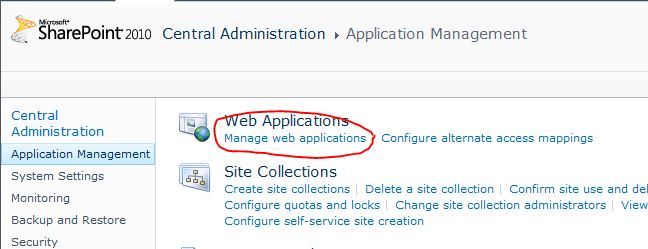
I need to define managed paths in SharePoint 2010. I cannot find link to it in Central Admin, where is it?

Thoughts:
Trivial after you find it, but took some browsing through the Central Admin in order to find the new location and realize that one really should pay attention to Ribbon.

Solution:
  1. Go to Central Administration -> Application Management -> Manage web applications


  2. Click on the web application for which you wish to define managed paths and click Managed Paths on the Ribbon.


  3. Proceed as usual


March 31, 2010

SP2010: My Site Memberships not showing sites

Problem:
Memberships section on My Site's My Profile section is empty and is not showing user as being a member of recently added sites.

Solution:
Memberships list is populated by the User Profile Service Application - User Profile to SharePoint Full Synchronization Timer Job which by default run once per hour. You can change the schedule or run it manually.


March 3, 2010

SP2010: Multilingual term store management

Problem:
After installing SharePoint 2010 Language Pack (LP), how do I define translations for term sets and terms in Term Store Management?

Solution:
  1. Remember that you first need to install the SharePoint Foundation LP, and after that the SharePoint Server LP (in this case server is English and additional German LP as installed)
  2. Go to Term Store Management Tool in Central Admin
  3. In Managed Metadata Service Properties screen, enable the new language by adding it as a Working Language


  4. Create your term set and term hierarchy, e.g., like in the image below.


  5. Change language from the drop-down menu below the TAXONOMY TERM STORE title
  6. Translate Term Set title by changing the Term Set Name property


  7. Translate Term title by changing the Default Label property


  8. Group titles cannot be translated
End result for German terms are as following:

February 18, 2010

SP2010: FIMSynchronizationService errors when running Profile Synchronization

Problem:
Profile import from AD fails. You are able to successfully create Synchronization Connection, but when trying to run Full or Incremental Profile Synchronization, you are greeted with errors in Application Event Log such as this:

Log Name: Application
Source: FIMSynchronizationService
Date: 17.2.2010 9:23:03
Event ID: 6050
Task Category: Management Agent Run Profile
Level: Error
Keywords: Classic
User: N/A
Computer: wv002578.eu.tieto.com
Description:
The management agent "MOSSAD-[SYNCHRONIZATION CONNECTION NAME]" failed on run profile "DS_DELTAIMPORT" because of connectivity issues.

Additional Information
Discovery Errors : "0"
Synchronization Errors : "0"
Metaverse Retry Errors : "0"
Export Errors : "0"
Warnings : "0"

User Action
View the management agent run history for details.

SharePoint log contains row:
UserProfile Synchronization: Encountered unexpected step result: stopped-connectivity.

Synchronization progress log contains:
[SYNCHRONIZATION CONNECTION NAME] Stage Active directory import
Additions 0

Updates 0

Unchanged 0

.............................
Successes 0
Failures 1

Start Time 2/18/2010 11:06:01 AM

-----------------------------------------------------------------


Thoughts:
Explanation for the error found in the SharePoint logs is found on this blog post. It is in fact the cause of the error, but the true solution to this problem is not that trivial.

What really happens when you create a Synchronization Connection in Central Admin? Behind the scenes SP2010 uses Forefront Identity Manager 2010, amongst other things, to do the actual profile importing from AD. You can find management console for this opening FIM Synchronization Service Manager (SSM) from C:\Program Files\Microsoft Office Servers\14.0\Synchronization Service\UIShell\miisclient.exe.

In SSM you can view the status of currently running synchronization jobs, as well as history of previously ran jobs. In the picture below you see the actual error (on yellow), and it is indeed caused because of missing permissions on the AD.

But, why is there wrong DC and Partition there (circled with red)? That is not the AD that was defined in Synchronization Connection, where the defined AD was set to be eu.tieto.com.


Looking at the respective Management Agent properties in SSM (picture below), one can see that eu.tieto.com domain has been replaced by tieto.com (on yellow), which is in this case completely different AD. eu in the Domain field is related to the user name used to do the actual synchronization, and is not related to this issue.


Furthermore, looking at the Directory Partitions definition for this Management Agent, there is some strange partition, CN=Configuration,DC=tieto,DC=com, which is again not at all related to the AD that was defined in SP2010 and where the profiles should be synchronized from.

Solution:
Grant Replicate Directory Changes permission on the cn=configuration container as described here: http://technet.microsoft.com/en-us/library/hh296982.aspx#RDCcn.

---OLD SOLUTION BELOW---
  1. Start FIM SSM (C:\Program Files\Microsoft Office Servers\14.0\Synchronization Service\UIShell\miisclient.exe)
  2. Go to Management Agents screen, right click on MOSSAD-[SYNCHRONIZATION CONNECTION NAME] and select Properties
  3. Go to Configure Directory Partitions and uncheck the directory partition that you didn't define in SP2010
  4. Click OK to close Properties window
  5. Again, right click on MOSSAD-[SYNCHRONIZATION CONNECTION NAME] and select Configure Run Properties...
  6. On DS_FULLSYNC, DS_DELTASYNC, DS_FULLIMPORT, DS_DELTAIMPORT, delete step for the directory partition you removed on bullet 3. NOTE! You must only remove the step for the directory partition you removed earlier on bullet 3. I.e., if the removed directory partition was 3rd on the list, you should delete 3rd Step.
  7. Click OK
  8. Re-run profile synchronization from Central Admin

January 12, 2010

SP2010 Beta 2: MySite's Organization Browser Silverlight crashes browser

Problem:
When trying to access Organization tab on My Profile page in SharePoint 2010 My Site, the Organization Browser Silverlight control partly loads, but soon freezes the browser, and consumes all available CPU (well, on multi-core CPUs only one core, to be exact). Only option is to kill browser process and stay away from the Organization Silverlight.

Thoughts:
When looking at the HTTP traffic using Fiddler, I noticed that page Silverlight control loading seemed to halt more or less immediately after querying information of a same specific individual using /MY/_vti_bin/SilverlightProfileService.json/GetUserSLProfileData.

Solution:
So, I went to the profile of this user and found out that if a person is a Manager of himself/herself, the Silverlight control will crash. It is probably going into some never-ending loop. In my case the problematic user was the most top-level manager. After I modified the profile of this user in Central Admin and cleared the manager field, Organization control started working.

SP2010 Beta 2: Error occurred during the processing of /my/default.aspx or /my/personcontent.aspx

Problem:
When you modify My Site master page (mysite.master) either using SharePoint Designer 2010 (SPD), or by creating new master page and setting your custom master page as Custom Master Page using SPD, you will end up with error when trying to access My Network page. You are not using any server side code blocks in your master page. In fact, you only need to create a new version of the default mysite.master without modifying it, and publish the new version, to get this error.

The error you see is: An error occurred during the processing of /my/default.aspx. Code blocks are not allowed in this file.

You might also get the same error from file /my/personcontent.aspx.

Solution:
You need to modify web.config and add the following PageParserPath (although you are not using inline code in your master page):

<SharePoint>
<PageParserPaths>
<PageParserPath VirtualPath="/my/default.aspx" CompilationMode="Always" AllowServerSideScript="true" />
</PageParserPaths>
</SharePoint>

January 11, 2010

SP2010 Beta 2: Access Denied when accessing My Content

Problem:
When trying to access My Content section in MySite in SharePoint 2010 Beta 2, you get error:

There has been an error creating the personal site. Contact your site administrator for more information

Furthermore, you get these errors in Application Event Log:

Log Name: Application
Source: Microsoft-SharePoint Products-SharePoint Foundation
Date: 11.1.2010 12:54:21
Event ID: 6141
Task Category: Topology
Level: Error
Keywords:
User: DOMAIN\SPFarmAdminAccount
Computer: mycomputer.domain.com
Description:
The site /my/personal/palojus could not be created. The following exception occurred: Access denied..


and

Log Name: Application
Source: Microsoft-SharePoint Products-SharePoint Portal Server
Date: 11.1.2010 12:54:21
Event ID: 5187
Task Category: Administration
Level: Error
Keywords:
User: DOMAIN\palojus
Computer: mycomputer.domain.com

Description:

My Site creation failure for user 'domain\palojus' for site url 'http://communities.domain.com/my/personal/palojus'. The exception was: Microsoft.Office.Server.UserProfiles.PersonalSiteCreateException: A failure was encountered while attempting to create the site. ---> System.Security.SecurityException: Access denied.
at Microsoft.SharePoint.Administration.SPPersistedObject.BaseUpdate()
at Microsoft.SharePoint.Administration.SPJobDefinition.Update()
at Microsoft.SharePoint.Taxonomy.TaxonomyFeatureReceiver.EnsureHiddenListFullSyncTimerJob(SPWebApplication webApplication)
at Microsoft.SharePoint.Taxonomy.TaxonomyFeatureReceiver.FeatureActivated(SPFeatureReceiverProperties properties)
at Microsoft.SharePoint.SPFeature.DoActivationCallout(Boolean fActivate, Boolean fForce)
at Microsoft.SharePoint.SPFeature.Activate(SPSite siteParent, SPWeb webParent, SPFeaturePropertyCollection props, Boolean fForce)
at Microsoft.SharePoint.SPFeatureCollection.AddInternal(SPFeatureDefinition featdef, Version version, SPFeaturePropertyCollection properties, Boolean force, Boolean fMarkOnly)
at Microsoft.SharePoint.SPTemplateAssociationElement.EnsureTemplateAssociatedSiteFeaturesActivated(SPSite site, String sTemplateName)
at Microsoft.SharePoint.SPFeatureManager.<>c__DisplayClass16.
...

The Zone of the assembly that failed was:

MyComputer
...


Thoughts:
1. Granting direct access to the user (in addition to obviously already having access via NT AUTHORITY\Authenticated Users) didn't have any effect.


2. Verifying My Site Settings (Central Administration --> Manage Profile Service --> User Profile Service Application --> My Site Settings --> Setup My Sites) didn't have any effect, as the settings were already correct.

Solution:
In My Site Settings (Central Administration --> Manage Profile Service --> User Profile Service Application --> My Site Settings --> Setup My Sites), I changed My Site Host slightly (".../my/" to ".../my2/").


Then I tried accessing My Content again, and My Site was created successfully. Finally I changed My Site Host back to original value and got some flash-backs from the good old MOSS times when many things didn't work, and suddenly they just started to work. Some things never change.