Showing posts with label PnP. Show all posts

September 11, 2025

SharePoint: Connect using access tokens in PnP PowerShell

Task

I had an string array of SPO site collection URLs and I needed to execute PowerShell script that fetches comments and likes of app pages across all of these site collections. For getting actual page specific likes and comments, there is PnP PowerShell commands Get-PnPPageLikedByInformation and Get-PnPListItemComment, and you get nice object array including date, and even comment content. No problem there.

However, in my one-time executable script I didn't want to do interactive login for each of those site collections, so I needed a way to somehow persist the credentials and reuse them every time I called Connect-PnPOnline towards each site collection.

Back in the days, all they way in on-prem SharePoint, you could use Get-Credential once and store the credentials in a variable and include that as the parameter in the connection PS command, whatever that was. It, however, hasn't worked in a long time when there are MFA and other requirements towards signing in to online services such as SharePoint Online.

Good thing there is a solution.

Solution

Access tokens to the rescue! 

# first connect normally to SPO, but remember to return the connection using ReturnConnection parameter
$conn = Connect-PnPOnline -ClientId [YOUR_CLIENT_ID] -Url [YOUR_SPO_URL] -ReturnConnection

# magic is here, first get the access token, you only need to do this once (note that token will expire at some point)
$token = Get-PnPAccessToken -Connection $conn -ResourceTypeName SharePoint

# then whenever you want to connect to new site collection, use the token instead of ClientId
$newConn = Connect-PnPOnline -AccessToken $token -Url [NEW_SPO_URL] -ReturnConnection

May 22, 2019

SharePoint: Determining if library root level folders have broken permission inheritance using PnP PowerShell

This simple script can be used to determine status of permission inheritance of document library root level folders.

 1
 2
 3
 4
 5
 6
 7
 8
 9
10
11
12
13
14
15
16
17
18
19
20
21
22
$siteUrl = "https://mytenant.sharepoint.com/sites/somesitecollection"
Connect-PnPOnline -Url $siteUrl -UseWebLogin
$context = Get-PnPContext 

$list = Get-PnPList "SomeLibrary"

$folders = $list.RootFolder.Folders
$context.Load($folders)
$context.ExecuteQuery()

foreach($folder in $folders)
{
  if($folder.ItemCount -gt 0)
  {    
    $f = Get-PnPFolder -Url $folder.ServerRelativeUrl -Includes ListItemAllFields.RoleAssignments, ListItemAllFields.HasUniqueRoleAssignments

    $context.Load($f)
    $context.ExecuteQuery()

    Write-Host $f.ServerRelativeUrl -> $f.ListItemAllFields.HasUniqueRoleAssignments
  }
}

April 26, 2018

SharePoint: Setting list field default and calculated values using PnP JS

Question

How to set list field default and calculated values using PnP JavaScript?

Solution

For default values:

list.fields.getByTitle("ProjectName").update({ DefaultValue: "some default value"});

For calculated values:

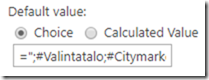
list.fields.getByTitle("ProjectName").update({ DefaultValue: "=\";#choice a;#choice b;#\""});

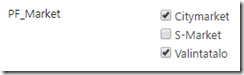
For calculated values it looks a bit nasty on SharePoint Online modern libraries, but filtering seems to work, as well as modifying choice selection. It looks and works nicely on classic side, although default value selection remains on Choice radio button.

Classic
imageimage
Modern
image